
Your SPF record can be syntactically perfect, list every service you send from, and still fail on every single email you send. No bounce, no error in your dashboard, no angry reply from a customer. Just a slow, unexplained drop in open rates.
The cause is one line buried in RFC 7208, section 4.6.4: an SPF check must not trigger more than 10 DNS lookups. Cross that limit and the receiving server returns a permerror, a permanent error. Most providers then treat your mail as if you had no SPF at all, and under a strict DMARC policy it can be quarantined or rejected outright.
We call it the #1 silent killer of deliverability, because it never announces itself. Here's how it works and how to get back under the limit for good.
Why does the limit exist?
SPF validation happens on the receiving server, at its expense. Every include: in your record forces that server to make a DNS query, and each include can contain more includes. Without a cap, a malicious (or just bloated) record could turn every inbound email into a DNS amplification attack against the receiver.
So the RFC drew a hard line: 10 lookups maximum, per SPF evaluation. It's not a recommendation. It's a protocol-level ceiling that every compliant mail server enforces.
What actually counts as a lookup?
This is where most people get it wrong. The limit isn't "10 includes": it's 10 DNS-querying mechanisms, counted recursively:
| Mechanism | Counts toward the limit? |
|---|---|
include: |
✅ Yes, plus everything inside it, recursively |
a |
✅ Yes |
mx |
✅ Yes |
ptr |
✅ Yes (and deprecated, so remove it) |
exists: |
✅ Yes |
redirect= |
✅ Yes |
ip4: / ip6: |
❌ No |
all |
❌ No |
The recursive part is the trap. include:_spf.google.com looks like one lookup, but Google's record contains three nested includes, so it really costs 4. You don't control what's inside third-party includes, and vendors add nested lookups without telling anyone.
How a normal domain quietly hits 12
Nobody designs a 12-lookup record. It accumulates. You start with Google Workspace, marketing adds Mailchimp, support adds Zendesk, the product sends transactional email through SendGrid, someone once trialed a survey tool and never removed it.
The diagram below shows the lookup tree of a typical SMB domain: each box is one DNS query, and the count crosses the line at lookup #11:
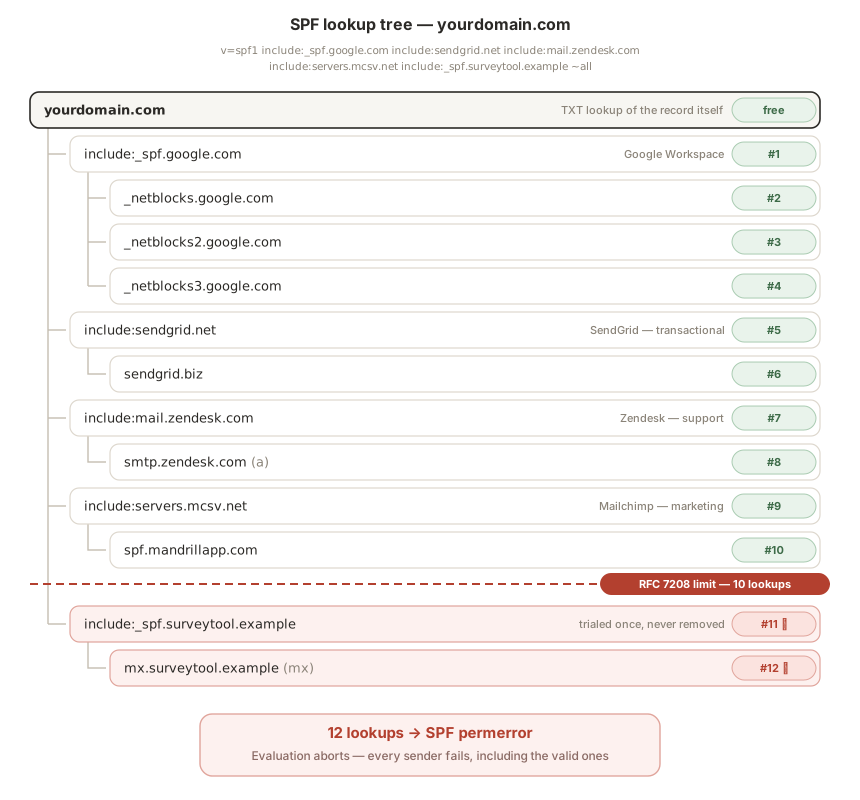
Five services. Twelve lookups. Every email now fails SPF, including the ones from Google Workspace, which was configured perfectly.
That's the cruelest part of a permerror: it doesn't fail the extra services, it fails everything. The evaluation aborts entirely.
How to check your own count
Run your domain through our free SPF checker. It resolves your full lookup tree recursively, like the diagram above but for your record, and tells you exactly which includes cost what.
If you're seeing SPF PermError: too many DNS lookups in your headers or DMARC reports, that's this exact problem, and we have a dedicated fix page for that error.
Four ways to get back under 10
1. Remove what you no longer use
The fastest win. Audit every include against reality: are you still sending through that tool? Old trial services, a migrated ESP, an agency you stopped working with: each dead include is 1–4 free lookups. Most bloated records lose 3+ lookups in this step alone.
2. Drop ptr and unnecessary a / mx
ptr is deprecated by the RFC itself and some receivers ignore it entirely: pure waste. And if your web server or MX hosts never send outbound mail directly, a and mx are costing you lookups for nothing. Replace them with explicit ip4: entries, which cost zero.
3. Flatten selectively
Replace an include: with the actual IP ranges behind it (ip4: / ip6: mechanisms are free). This works well for vendors with stable, published IP ranges.
⚠️ But never flatten blindly: providers rotate IPs without notice, and a flattened record you don't maintain will silently start failing legitimate mail, the exact problem you were trying to solve, in reverse. Flatten stable vendors, keep dynamic ones (Google, Microsoft) as includes. We cover the full method in our guide to SPF flattening.
4. Split by subdomain
The limit applies per domain evaluated, so subdomains each get their own budget of 10. Send marketing from news.yourdomain.com, transactional from mail.yourdomain.com, and corporate mail from the root domain. Each record stays small, and a deliverability incident on one stream no longer contaminates the others. This is the clean long-term architecture, and it also improves your DMARC reporting granularity.
Fixed today, broken next quarter
Here's the uncomfortable truth: your lookup count isn't static. Third-party vendors restructure their SPF records regularly, and a nested include added on their side can push you from 9 to 11 lookups overnight, with zero change on yours.
That's why a one-time fix isn't enough. Inboxight re-counts your full lookup tree at every check, around the clock, and alerts you the moment you cross 10, with the cause, the impact, and the numbered fix. Before your open rate notices.
Check your count now: inboxight.com/tools/spf-checker: free, no account.
FAQ
What counts toward the SPF 10 lookup limit?
Every mechanism that triggers a DNS query: include:, a, mx, ptr, exists: and redirect=. Each costs at least one lookup, and an include: also costs every lookup nested inside it. ip4:, ip6: and all cost nothing.
Do nested includes count separately?
Yes. The limit is counted recursively, so include:_spf.google.com is not one lookup but four, because Google's record contains three more includes inside it. You are charged for the whole tree, not just the top level.
What happens when SPF goes over 10 lookups?
The receiver returns a permerror, a permanent failure. Most providers then treat the message as if you had no SPF at all, and under a strict DMARC policy it can be quarantined or rejected. The evaluation aborts entirely, so even a correctly configured sender fails.
Do ip4 and ip6 mechanisms count?
No. Listing IP ranges directly with ip4: or ip6: costs zero lookups, which is why flattening an include: into its published ranges is one way back under the limit.
How do I reduce my SPF DNS lookups?
Remove services you no longer send from, drop ptr and any unnecessary a or mx, flatten stable vendors into ip4: ranges, and split high-volume streams across subdomains so each record keeps its own budget of 10.
Further reading: SPF PermError: too many DNS lookups · SPF, DKIM & DMARC setup for Google Workspace · All setup guides