
If you've read our guide to the SPF 10 DNS lookup limit, you know the trap: every include: costs DNS lookups, nested includes multiply silently, and crossing ten turns your SPF into a permanent error. You also know the cheapest fixes, remove dead services, drop ptr, replace a/mx with explicit IPs.
When those aren't enough, there's flattening: the most powerful lever, and the one that breaks the most mail when done blindly. This is the guide to doing it right.
What flattening actually is
SPF's lookup budget only counts mechanisms that trigger DNS queries. ip4: and ip6: entries cost zero, they're literal ranges, nothing to resolve. Flattening exploits that: take an include:, resolve its entire tree down to the IP ranges it ultimately authorizes, and publish those ranges directly instead.
# Before: 3 lookups
v=spf1 include:_spf.stabletool.example ~all

# After: 0 lookups, same authorization
v=spf1 ip4:203.0.113.0/24 ip4:198.51.100.0/22 ~all
Same servers authorized, three lookups reclaimed. Flatten a couple of heavy includes and a 12-lookup record drops comfortably under the limit.
The trap that makes flattening dangerous
Here's what the quick-fix tutorials skip: an include is a live pointer; a flattened range is a snapshot. When you include _spf.vendor.com, the vendor updates their ranges and your record follows automatically. When you flatten, you've frozen their infrastructure as it existed the day you resolved it.
Providers rotate IPs without announcements, new regions, new pools, migrations. The day your vendor sends from an IP outside your snapshot, that mail fails SPF. No error on your side, no DNS change, nothing in a diff: just legitimate mail quietly failing authentication, which at DMARC enforcement means quarantined or rejected. You've traded a visible, immediate problem (permerror) for an invisible, delayed one, the exact failure you were trying to escape, in reverse.
The conclusion isn't "don't flatten." It's: flattening is a maintenance commitment, not a one-time edit. Decide what to flatten accordingly.
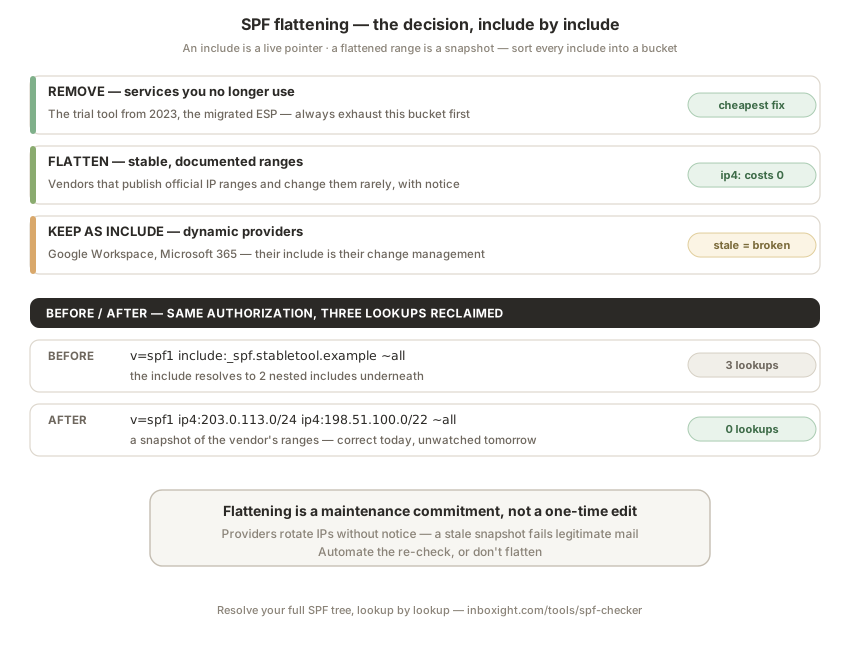
The decision, include by include
Run your record through our SPF checker to see the full resolved tree, which includes cost what, down to the leaf ranges. Then sort every include into one of three buckets:
Remove entirely. Services you no longer send through. Zero maintenance, instant savings, and there's almost always at least one, the trial tool from two years ago, the migrated ESP. Always exhaust this bucket first; deleting is cheaper than flattening.
Flatten. Vendors with stable, documented IP ranges, the ones that publish their ranges on a docs page and change them rarely, with notice. Also good candidates: small self-hosted senders you control (your own SMTP relay's static IP never needed an include in the first place).
Keep as include. The big dynamic clouds, Google Workspace, Microsoft 365, whose ranges genuinely shift, and any vendor whose docs say "include our record" without publishing stable ranges. Their include is their change-management mechanism; flattening them is signing up to chase their infrastructure by hand. Their cost is real (Google's include resolves to 4 lookups) but it buys you automatic correctness.
If the arithmetic still doesn't close after removing, flattening the stable, and keeping the dynamic, split by subdomain: each subdomain gets its own 10-lookup budget, and separating marketing, transactional and corporate mail streams is good architecture anyway.
Flattening properly, step by step
- Resolve the full tree first. Snapshot the include's complete resolution, nested includes,
a/mxmechanisms, everything it ultimately authorizes. - Cross-check against the vendor's published ranges. If their docs list official ranges, prefer those over your resolved snapshot, docs pages are commitments; DNS state at 3pm on a Tuesday isn't.
- Publish the ranges, keep the record readable. Group and comment your DNS changes so future-you knows which
ip4:blocks belong to which vendor, an anonymous wall of CIDR is unmaintainable. - Verify before and after. Re-run the checker: lookup count under 10, record syntactically valid, and, important, still under DNS size comfort. A flattened record with dozens of ranges can bloat the TXT response toward UDP limits; if your
ip4:list is getting huge, that vendor was probably a "keep as include" case. - Send test mail through every flattened vendor and confirm
SPF: PASSin the headers before calling it done.
Keeping it alive
The snapshot decays, so the re-check must be automatic, not aspirational. Two workable approaches:
Monitor the drift. Keep flattened ranges, but continuously compare them against the vendor's live SPF tree, and alert on divergence. This is built into Inboxight: we re-resolve your full tree around the clock, re-count your lookups, and flag when a flattened vendor's actual ranges no longer match what you've published, before their next campaign fails.
Delegate to dynamic SPF. Managed-SPF services host your record and re-flatten automatically; you publish one include pointing at them. It works, with trade-offs worth naming: that include still costs a lookup, your authentication now depends on a third party's uptime, and you've added the very kind of external pointer flattening was meant to remove. Reasonable for complex estates; overkill when monitoring plus a quarterly touch-up covers it.
Either way, the rule that survives every setup: after any change to your sending stack, new tool, vendor migration, agency change, re-run the full check. Flattened records fail at the speed of other people's infrastructure decisions.
FAQ
Does SPF flattening break anything by itself?
The act of flattening doesn't, correctly resolved ranges authorize exactly the same servers. The breakage comes later, when the vendor's real ranges drift away from your snapshot. That's why the flatten/keep decision hinges on how stable the vendor's ranges are, and why flattened records need automated re-checking.
Should I flatten Google Workspace or Microsoft 365?
No. Their ranges are large and genuinely dynamic, and their includes are how changes reach you automatically. Pay their lookup cost, reclaim your budget from stable or unused includes instead, and split subdomains if the math still doesn't close.
How often do flattened IP ranges need updating?
There's no fixed calendar, ranges change when vendors change them, without notice. Quarterly manual reviews are the floor for low-stakes setups; continuous automated comparison against the vendor's live tree is the reliable answer, since a single missed rotation means silently failing mail.
Is there a limit to how many ip4 entries I can publish?
No lookup cost, but practical limits: TXT strings cap at 255 characters (split into multiple quoted chunks), and very large records push DNS responses toward UDP size limits. If one vendor requires dozens of ranges, treat that as a sign it belongs in the "keep as include" bucket.
Are automated SPF flattening services worth it?
For estates with many domains and volatile vendors, often yes. Weigh the trade-offs: their include still costs one lookup, and your SPF now depends on their availability. For a typical domain, removing dead includes, flattening only stable vendors, and monitoring the drift achieves the same safety with one less dependency.
Further reading: The SPF 10 DNS lookup limit · Resolve your full SPF tree · DMARC from p=none to p=reject · Why your emails go to spam