
p=none satisfies Google and Yahoo's bulk sender requirement. It also protects you from exactly nothing: anyone can still spoof your domain, and receivers will deliver it. Monitoring mode is a starting line, yet industry datasets consistently show around four in ten domains with a DMARC record parked there permanently, engaged enough to publish a policy, never confident enough to enforce it.
The fear is legitimate: tighten too fast and you quarantine your own invoices. This guide is the staged path that avoids that, updated for the new DMARC standard, because the old playbook officially broke this year.
First, forget the pct ramp
Every migration guide written before 2026 tells you to ramp up with pct=10, then 25, 50, 100. Don't. In May 2026 the IETF published RFC 9989 (with 9990 and 9991), replacing RFC 7489, and the new standard removes the pct tag entirely. Receivers implemented it so inconsistently that it rarely did what anyone expected, so it's gone, along with rf and ri.
Two consequences for your migration:
- A compliant receiver now treats
pct=25aspct=100. If a partial percentage was your safety margin, that margin no longer exists, remove the tag at your next DNS edit. - The replacement is the
t(testing) flag:t=ydowngrades the effective policy one step. Ap=reject; t=yrecord behaves likep=quarantine, which gives you a proper dress rehearsal for full enforcement, somethingpctnever reliably delivered.
The staged path below uses it.
Stage 1: Monitor with p=none (4–6 weeks)
Publish, if you haven't already:
v=DMARC1; p=none; rua=mailto:[email protected]
The rua address is the whole point of this stage: aggregate reports tell you every IP sending as your domain and whether it passes. Let them accumulate for at least four weeks, monthly senders (billing runs, newsletters) only show up if you wait. Raw reports are gzipped XML from dozens of receivers; how to actually read them is its own article, and it's the part Inboxight automates for you.
Exit criteria: you can name every legitimate sending source in your reports.
Stage 2: Fix alignment for every source (1–3 weeks)
For each legitimate source, make it pass aligned SPF or DKIM, the domain in your From: header must match the authenticated one. This is where migrations actually fail: a vendor signing as mail.vendor.com authenticates fine but doesn't align, and the day you enforce, its mail dies. Every serious platform has a custom-domain setting; our per-ESP guides cover where it lives. Prefer aligned DKIM wherever possible, it survives forwarding, SPF doesn't.
Exit criteria: your reports show ≥ 98–99% of legitimate volume passing aligned for two consecutive weeks.
Stage 3: Enforce quarantine
v=DMARC1; p=quarantine; rua=mailto:[email protected]
Failing mail now lands in spam instead of the inbox, recoverable if you got something wrong. Keep watching reports: fix any legitimate source that surfaces, and expect a residual trickle of failures from forwarding and mailing lists (normal, and precisely why DKIM matters). Hold this stage 2–4 weeks.
While you're editing DNS, add the new np tag: np=reject hard-fails mail from non-existent subdomains, a spoofing vector the old standard left open. Nothing legitimate sends from subdomains that don't exist, so this one is safe immediately.
Stage 4: Rehearse reject with t=y
v=DMARC1; p=reject; np=reject; t=y; rua=mailto:[email protected]
This is the modern replacement for the pct ramp. Your published intent is reject, but t=y tells receivers to apply it one step down, quarantine, while you watch the reports one last time. Two weeks of clean data here means full enforcement holds no surprises.
Stage 5: Full enforcement
Remove t=y (or set t=n):
v=DMARC1; p=reject; np=reject; rua=mailto:[email protected]
Spoofed mail is now refused outright. Keep the rua reporting forever, enforcement isn't the end of monitoring, it's what makes monitoring meaningful: new vendors, rotated DKIM keys, and SPF drift will all try to break your alignment eventually.
The whole ladder, and the honest timeline
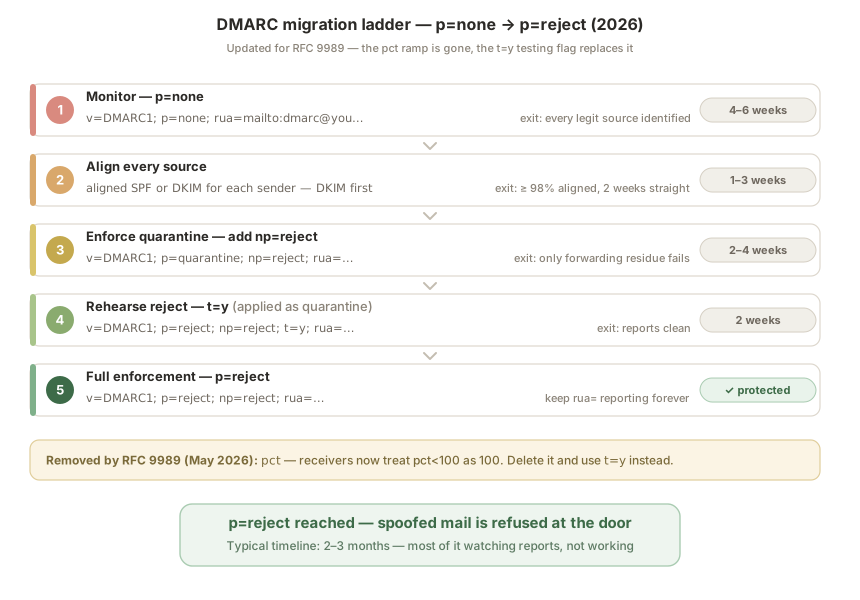
p=none → fix alignment → p=quarantine → p=reject; t=y → p=reject. For a domain with a handful of sending services, the full path takes 2–3 months, most of it waiting on reports, not working. Organizations with dozens of sources should run the same ladder subdomain by subdomain, tightening sp= as each stream proves clean.
Run your current record through our free domain checker to see your policy, alignment status and deprecated tags in one pass. And since every stage of this ladder is gated on reading aggregate reports, Inboxight turns that gzipped XML into a per-source pass/fail dashboard and alerts you when something legitimate starts failing, at p=reject, that alert is the difference between a blip and lost mail.
FAQ
How long does the migration from p=none to p=reject take?
Plan for 2–3 months for a typical domain: 4–6 weeks monitoring, 1–3 weeks fixing alignment, then 2–4 weeks at each enforcement stage. Rushing the monitoring phase is the main cause of broken migrations, monthly senders won't appear in a one-week sample.
Can I skip quarantine and go straight to p=reject?
You can, but you shouldn't. Quarantined mistakes land in spam folders and can be recovered; rejected mistakes bounce and are gone. Quarantine, and now p=reject; t=y, exist precisely to make errors survivable.
Is the pct tag still supported in 2026?
No. RFC 9989 (May 2026) removed it, and compliant receivers treat any pct value below 100 as 100, a partial percentage no longer holds anything back. Remove it from your record and use the t=y testing flag for staged rollout instead.
What exactly does t=y do?
It applies your policy one step down: p=reject; t=y is treated as quarantine, and p=quarantine; t=y as none. It's an in-spec dress rehearsal, publish your target policy, watch the reports, then flip to t=n or drop the tag.
What should I do about subdomains?
Add np=reject early, it only affects non-existent subdomains, which never send legitimate mail. For real subdomains, the sp= tag sets their policy; if different teams send from different subdomains, migrate each stream up the same ladder at its own pace.
Further reading: How to read a DMARC report · Google & Yahoo sender requirements in 2026 · SPF, DKIM & DMARC setup guides by ESP · Check your domain