
In February 2024, Google and Yahoo turned email authentication best practices into hard requirements. Two years later, the grace period is over: enforcement is fully active, Microsoft has joined with near-identical rules for Outlook, and non-compliant bulk mail now gets a permanent 550 rejection: it doesn't land in spam, it never arrives at all.
If you send email from your own domain, these rules apply to you. Here's exactly what's required in 2026, tier by tier, and how to verify your domain passes.
Who counts as a "bulk sender"?
The requirements split into two tiers:
- All senders: every domain sending to Gmail, Yahoo or Outlook addresses, even ten emails a day.
- Bulk senders: domains sending roughly 5,000+ messages per day to Gmail addresses. The count is per sending domain, subdomains included.
One detail trips people up: the bulk status is sticky. Cross 5,000/day once, whether a product launch or a Black Friday campaign, and Google treats you as a bulk sender from then on. If there's any chance you'll send a large campaign this year, build to the bulk-sender standard now.
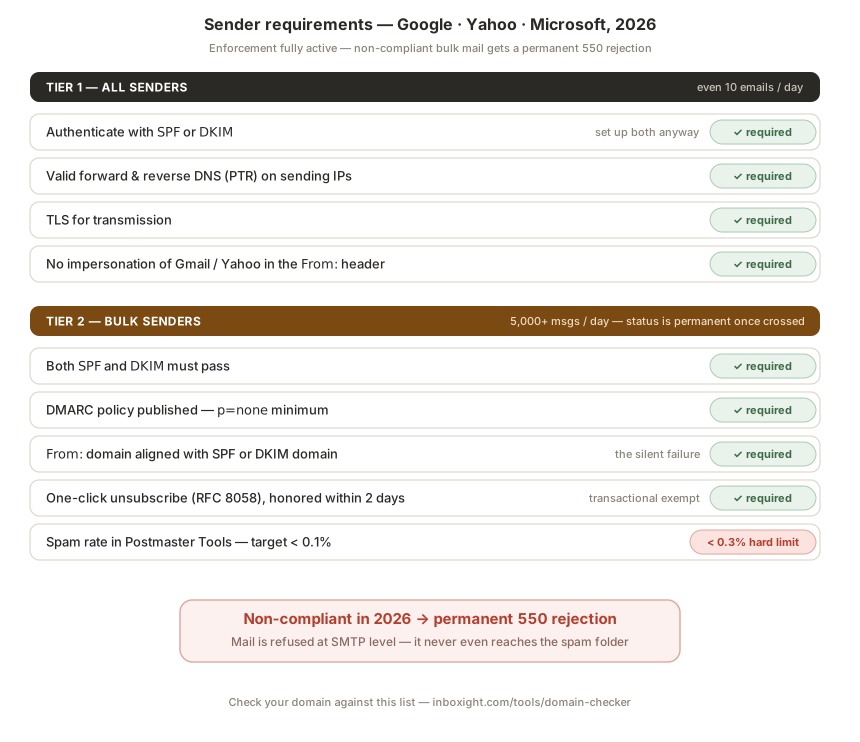
Tier 1: Requirements for every sender
1. Authenticate with SPF or DKIM. At minimum one of the two must pass on your sending domain. In practice, set up both, since you'll need both for tier 2 anyway, and DKIM survives forwarding where SPF doesn't.
2. Valid forward and reverse DNS. Your sending IPs need PTR records that resolve back to a hostname pointing at the same IP. If you send through an ESP (SendGrid, Brevo, Mailgun…), they handle this; if you run your own SMTP, check it.
3. TLS for transmission. All major ESPs do this by default. Self-hosted senders: verify STARTTLS is enabled.
4. Keep spam complaints low. The hard thresholds are a bulk-sender rule, but Gmail throttles any domain that generates complaints.
5. Don't impersonate the provider. A From: header using gmail.com or yahoo.com on mail you send through your own infrastructure will fail DMARC on their domains and be rejected.
If your mail is bouncing with 550 5.7.26 unauthenticated email, tier 1 is exactly what's failing, and we break down that specific error and its fix on our dedicated page.
Tier 2: Additional requirements for bulk senders
6. Both SPF and DKIM must pass. Not one or the other, but both.
7. A DMARC policy must exist. p=none is the accepted minimum. Publishing v=DMARC1; p=none; rua=mailto:... takes five minutes and satisfies the requirement, though moving toward p=quarantine or p=reject is where the real protection is (that migration is its own guide).
8. DMARC alignment. This is the one most senders silently fail. The domain in your visible From: header must match the domain that passed SPF or the one that signed DKIM. Sending from news.yourbrand.com while your platform signs as mail.vendor.com? You authenticate, but you don't align, and DMARC fails. Every serious ESP has a "custom domain" or "domain authentication" setting to fix this; our per-ESP setup guides show where it lives for each platform.
9. One-click unsubscribe (RFC 8058). Marketing and promotional mail must carry the List-Unsubscribe and List-Unsubscribe-Post headers, the link must work without a login, and opt-outs must be honored within two days. Transactional mail (receipts, password resets) is exempt. Yahoo and Apple require it too; Microsoft strongly recommends it.
10. Spam rate below 0.3%, aim for 0.1%. Measured in Google Postmaster Tools, which you should register for today if you haven't. Read the numbers the right way: 0.3% is not a budget, it's the cliff. Google's own guidance is to stay under 0.1% and never touch 0.3%: once you spike past it, deliverability drops and takes weeks to recover. Yahoo enforces its own equivalent threshold independently.
What happens if you don't comply
Enforcement ramped up progressively and is now fully live. In 2026 the sequence looks like this: temporary errors (4xx) on a share of your traffic first, then increased spam-foldering, then permanent 550 rejections on non-compliant mail, and Google and Microsoft both issue them. At that point your open rate doesn't dip, it disappears, and recovering sender reputation takes far longer than the fix itself would have.
The frustrating part: most failures we see aren't negligence, they're drift. A DKIM key rotated by a vendor, an SPF record that crossed the 10-lookup limit, an alignment broken by a new sending tool. Compliance isn't a project you finish, it's a state you maintain.
Check your domain in 60 seconds
Our free domain checker runs your domain against this exact checklist (SPF, DKIM, DMARC presence and alignment, lookup count, PTR) and returns a score with the numbered fixes. No account needed.
And because drift, not setup, is what breaks compliance: Inboxight re-checks all of it around the clock and alerts you the moment something falls out of line, before Gmail does it for you, the hard way.
FAQ
Do these requirements apply to me if I send fewer than 5,000 emails a day?
Yes, tier 1 applies to everyone: SPF or DKIM, valid PTR records, TLS, and low complaint rates. Only the tier 2 rules (DMARC, alignment, one-click unsubscribe, the 0.3% threshold) are specific to bulk senders.
Is 5,000 emails per day counted across all my tools?
Yes. The threshold is per sending domain, not per platform. 3,000 from your ESP plus 2,500 transactional from your app on the same domain makes you a bulk sender, and the status persists once you've crossed it.
Does one-click unsubscribe apply to transactional email?
No. Receipts, password resets, shipping notifications and similar transactional messages are exempt. It applies to marketing, promotional and newsletter traffic.
Is p=none enough for DMARC compliance?
For the letter of the requirement, yes. But p=none only monitors, it doesn't stop anyone from spoofing your domain. Treat it as the entry ticket, then migrate to p=quarantine and p=reject once your reports are clean.
What spam rate should I actually target?
Under 0.1%. The 0.3% figure is the enforcement trigger, not a safe zone: sustained rates between the two already degrade inbox placement, and crossing 0.3% causes damage that takes weeks to undo.
Further reading: The SPF 10 DNS lookup limit · SPF, DKIM & DMARC setup for Google Workspace · Microsoft 365 setup guide · 550 5.7.26 unauthenticated email