
You published a DMARC record with a rua= address, and now your inbox fills up with attachments named things like google.com!yourdomain.com!1753...xml.gz. Congratulations: receivers are telling you exactly who sends mail as your domain and whether it authenticates. Less great: they're telling you in gzipped XML, one report per receiver per day, and nobody reads that by hand for long.
Here's how to decode them, the fields that matter, the ones that don't, and the four patterns that cover virtually every row you'll ever see.
Aggregate vs failure reports
Two report types exist. Aggregate reports (rua=) are the ones that matter: daily summaries from each receiver, counting messages per source IP with their authentication results. Failure reports (ruf=) were meant to be per-message forensic copies, but most major receivers never send them for privacy reasons, don't build your process on them. Everything below is about aggregate reports, whose format is now standardized by RFC 9990 (May 2026).
Anatomy of the XML
Every report has three parts. First, <report_metadata>: who sent it (Google, Yahoo, Microsoft…) and the date range it covers, typically 24 hours. Second, <policy_published>: your own DMARC record as the receiver saw it, a useful sanity check that your latest DNS edit propagated. Third, the part you actually read: one <record> per source IP.
<record>
  <row>
    <source_ip>198.51.100.10</source_ip>
    <count>1423</count>
    <policy_evaluated>
      <disposition>none</disposition>
      <dkim>pass</dkim>
      <spf>fail</spf>
    </policy_evaluated>
  </row>
  <identifiers>
    <header_from>yourdomain.com</header_from>
  </identifiers>
  <auth_results>
    <dkim><domain>yourdomain.com</domain><result>pass</result></dkim>
    <spf><domain>bounce.esp-vendor.com</domain><result>pass</result></spf>
  </auth_results>
</record>
The one distinction that unlocks everything
Notice something odd above: SPF shows pass in <auth_results> but fail in <policy_evaluated>. That's not a contradiction, it's the whole key to reading these reports:
auth_resultsis the raw outcome: did SPF pass for whatever domain was checked, did a DKIM signature validate, and for which domain.policy_evaluatedis the aligned outcome: the DMARC verdict, which only counts a pass if the authenticated domain matches yourheader_from.
In the example, SPF passed, but for bounce.esp-vendor.com, not yourdomain.com. Unaligned, so DMARC scores it as an SPF fail. The message still passes DMARC overall because DKIM passed and aligned. One aligned pass is all it takes.
When you see raw passes turning into evaluated fails, you don't have an authentication problem, you have an alignment problem, usually fixed in your ESP's custom-domain settings.
The four patterns in every report
Group your records by source IP, identify each owner (reverse DNS on the IP usually tells you: outbound.mailchimp.com, smtp.sendgrid.net…), and every row falls into one of four buckets:
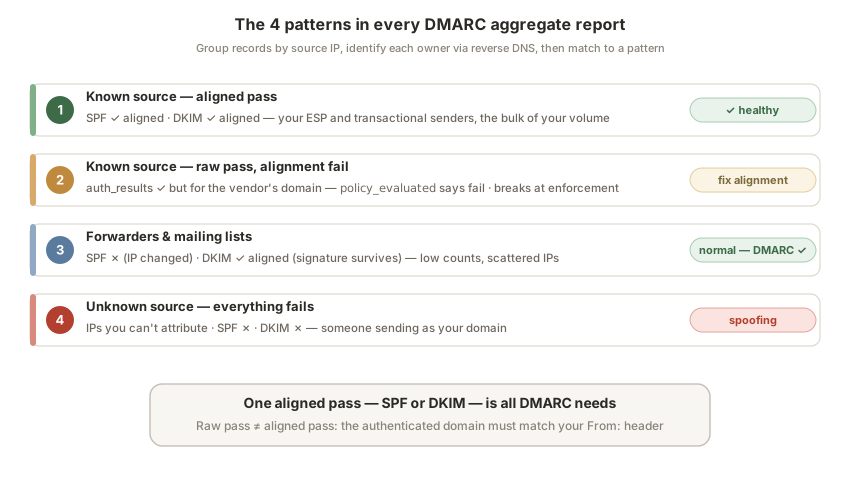
Pattern 1, Known source, aligned pass. Your ESP, your transactional provider, your office suite. High counts, pass in both raw and evaluated results. Healthy, this should be the overwhelming majority of your volume.
Pattern 2, Known source, raw pass, alignment fail. The example above: a vendor authenticating under its own domain. This is the pattern that breaks mail when you move to p=quarantine or p=reject, and the main thing to fix during your monitoring phase.
Pattern 3, SPF fails, DKIM passes aligned. Typical of forwarders and mailing lists: forwarding changes the sending IP (killing SPF) but preserves your DKIM signature. Low counts, scattered IPs, DMARC still passes. Normal, and the reason aligned DKIM, not SPF, is your load-bearing wall.
Pattern 4, Unknown source, everything fails. IPs you can't attribute, failing both checks, often from unexpected countries. That's spoofing, someone sending as your domain. No fix needed on your side: this is precisely what your policy exists to block. At p=none it's being delivered anyway; consider it your motivation to finish the migration.
What's new in reports since RFC 9990
The 2026 revision added optional fields you'll start seeing as receivers upgrade: discovery_method (how the receiver found your record), policy_test_mode (whether your t=y flag was honored, handy during a staged rollout), and a generator field identifying the reporting software. Nothing you must act on, but don't be surprised by unfamiliar tags.
Reading them at scale (or: don't)
Manual reading works for one domain and a curious afternoon. It stops working immediately after: 5–15 reports a day across receivers, each covering different windows, each a gzip to open, with the story split across all of them, Google might show a vendor aligned while Yahoo catches the same vendor failing.
This is the part Inboxight automates: point your rua= at your monitoring address, and the XML becomes a per-source dashboard, every sender identified, pass rates over time, and an alert the moment a legitimate source starts failing or an unknown one starts spoofing. To see where your domain stands right now, run it through the free DMARC checker first.
FAQ
Why am I receiving DMARC reports from Google and Yahoo?
Because your DMARC record asks for them: the rua= tag contains the address where receivers send daily aggregate reports. It means your record is working, receivers are seeing your mail and reporting on it.
What's the difference between aggregate (RUA) and failure (RUF) reports?
Aggregate reports are daily per-receiver summaries grouped by source IP, the operational tool. Failure reports were designed as per-message forensic copies, but most major receivers don't send them for privacy reasons, so aggregate reports are where the real signal lives.
Does a failing row in my report mean I'm under attack?
Not necessarily. Check the source first: a known vendor failing alignment is a configuration issue on your side, and forwarders legitimately fail SPF while passing DKIM. Unknown IPs failing everything are the actual spoofing, expected background noise for any visible domain, and exactly what enforcement blocks.
How often are reports sent?
Typically once per day per receiver, covering a 24-hour window. Send volume to many providers and you'll collect several reports daily, each holding only that receiver's slice of the picture.
Can I read DMARC reports without a tool?
Yes, unzip, open the XML, apply the four patterns above. It's genuinely worth doing a few times to understand your mail flows. As a routine, it doesn't scale: cross-receiver aggregation and alerting on changes is what tooling is for.
Further reading: Moving DMARC from p=none to p=reject · Google & Yahoo sender requirements in 2026 · Check your DMARC record · Setup guides by ESP