
A bounce message mentions Spamhaus, a monitoring alert flags a listing, or your open rate just fell off a cliff and a scan confirms the reason. The instinct is universal: find the delist form, submit, refresh. It's also the single most common mistake in blacklist removal.
Blacklist operators track repeat listings. Delist before fixing what got you listed, and you'll be relisted within hours or days, and the second removal is slower and more suspicious than the first. Some operators refuse domains that bounce back too quickly. The process that actually works has five steps, and the delist request is the fourth, not the first.
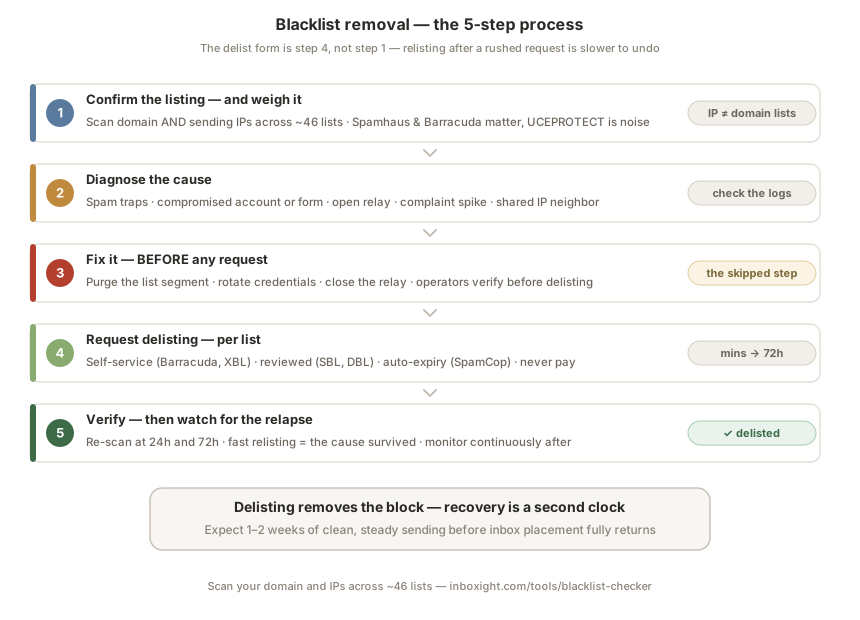
Step 1: Confirm the listing, and weigh it
First, establish the facts: which lists, and for what, because IP blacklists and domain blacklists are different animals. IP lists (Spamhaus SBL/XBL, Barracuda) flag the server that sent the mail; domain lists (Spamhaus DBL, SURBL, URIBL) flag your domain itself, and follow you even if you change infrastructure. Check both: run your domain and your sending IPs, your ESP's outbound IPs, not your office connection, through our blacklist checker, which queries ~46 lists in one pass.
Then weigh what you find, because lists are wildly unequal:
- Tier 1, act now: Spamhaus (ZEN aggregates SBL, XBL, PBL; DBL for domains), Barracuda, SpamCop. These feed real provider filters; a listing here explains real bounces.
- Tier 2, worth handling: SURBL, URIBL, a handful of regional lists with actual usage.
- Noise, usually ignorable: UCEPROTECT L2/L3 and similar network-range lists. They list entire IP blocks because of a neighbor's behavior, almost no major receiver queries them, and senders routinely show excellent inbox placement while "listed." A paid "express delisting" option is the tell: real blacklists never charge for removal.
Each list has its own character, criteria and removal quirks, our per-list pages cover all of the ones we scan, individually.
One special case that isn't an accusation: Spamhaus PBL. It lists IP ranges that shouldn't send mail directly (residential, dynamic). If you're on it, nobody thinks you spammed, you're sending from an IP class that policy says shouldn't run an SMTP server. The fix is relaying through your ISP or an ESP, or a self-service PBL removal if you legitimately operate a mail server on a static IP.
Step 2: Diagnose what got you listed
Every listing has a cause, and the operators document theirs, Spamhaus lookup pages tell you which list and often why. The usual suspects, roughly in order of frequency:
Spam trap hits. Old or purchased lists contain recycled addresses converted into traps. One send to a trap network can trigger a listing, and it means your list hygiene, not your server, is the problem.
A compromised account or form. A hacked mailbox, a leaked SMTP credential, or an unprotected contact form suddenly pumping out volume. Check your outbound logs: hundreds of messages per hour from a quiet server is the signature.
An open relay or infected machine. Misconfigured SMTP accepting anyone's mail, or malware on a machine sharing your IP. XBL listings usually point here.
Complaint spikes. Aggressive sending to unengaged lists, the same reputation layer that lands you in spam folders eventually lands you on lists.
A shared IP neighbor. On a shared ESP pool, someone else's campaign can get the IP listed with your mail on it. If your domain is clean but the ESP's IP is listed, this is your provider's incident to fix, escalate to them, and treat repeat episodes as a reason to change pools or go dedicated.
Step 3: Fix it before you request anything
The step everyone skips, and the one operators verify. Whatever step 2 surfaced: purge the list segment that hit the traps (pull bounce data, remove every hard bounce, re-verify what remains), rotate the compromised credentials and patch the form, close the relay, clean the malware, pause the offending campaign. Then confirm your baseline is healthy, authentication passing and aligned, no unusual outbound volume, because delist reviewers check. Spamhaus investigators in particular will deny requests where the underlying problem is still visible, and a denial makes the next attempt harder.
Step 4: Request delisting, per list
Now, and only now, the forms. Processes differ by list, the exact links and quirks are on each of our per-list pages, but they fall into four families:
Self-service forms. Barracuda's removal request typically processes in 12–24 hours. Spamhaus XBL and PBL removals are automated, often minutes to an hour once the cause is gone.
Reviewed requests. Spamhaus SBL and DBL involve human review: explain what happened and what you fixed, specifically. "Please delist us" gets queued; "a compromised form was sending since the 14th, it's patched, credentials rotated, logs clean for 48h" gets processed. Expect 24–72 hours; repeat offenses take longer and need more documentation.
Auto-expiry. SpamCop delists automatically 24–48 hours after trap hits stop, no form needed; fixing the cause is the request.
Provider-internal lists. Gmail and Outlook mostly run internal reputation systems, not public DNSBLs. Outlook has a sender support process for blocks; Gmail has no delist form at all, recovery there is reputation repair, not delisting.
And to repeat the rule from step 1: never pay. Legitimate operators delist for free; a price tag marks a list not worth caring about.
Step 5: Verify, then watch for the relapse
After confirmation, re-scan at 24 and 72 hours: fast relisting means the cause survived your fix. Then keep two clocks in mind. Delisting removes the block, but reputation recovery is separate, expect 1–2 weeks of clean, steady sending before inbox placement fully returns, longer for severe episodes.
The uncomfortable truth about blacklists is that the first listing is usually discovered late, after days of silent bounces. That's the part worth automating: Inboxight monitors your domain and IPs across all ~46 lists continuously and alerts you the moment a listing appears, with the list's weight and its removal process attached. The difference between a two-hour incident and a two-week one is almost always detection time. Start with a free scan: inboxight.com/tools/blacklist-checker.
FAQ
How long does blacklist removal take?
Automated lists (Spamhaus XBL/PBL) clear in minutes to hours once the cause is fixed; Barracuda typically 12–24 hours; reviewed Spamhaus listings 24–72 hours; SpamCop auto-expires within 24–48 hours of the last trap hit. Add 1–2 weeks of clean sending for full reputation recovery, and expect repeat offenses to take longer at every step.
Should I pay for expedited delisting?
No. Every blacklist that matters removes listings for free once the cause is fixed. Paid "express" delisting is the signature of network-range lists that few receivers query, if a list charges, that's your signal it wasn't affecting your delivery in the first place.
What if Spamhaus rejects my delisting request?
It means their investigators still see the problem, the fix is incomplete, or your request didn't explain it. Re-verify the root cause is actually gone, wait ~24 hours of clean logs, and resubmit with specifics: what happened, when, what you changed, and evidence it stopped.
I'm blacklisted but my emails still seem to deliver: why?
Because the list you're on isn't consulted by your recipients' providers. Network-range lists like UCEPROTECT L2/L3 list thousands of innocent IPs and are ignored by virtually all major receivers. Weigh the list before reacting, a Spamhaus or Barracuda listing shows up in your bounces; noise lists don't.
Does Gmail use public blacklists?
Only marginally. Gmail relies primarily on its own reputation system, fed by user spam reports and engagement, which is why there's no Gmail delist form. If you're blocked at Gmail with a clean blacklist scan, the problem is sender reputation: check Postmaster Tools and work the reputation layer.
Further reading: Why your emails go to spam · All blacklists we monitor, list by list · Check your domain and IPs now · Google & Yahoo sender requirements