
Search this question and you'll find listicles: "17 reasons your emails go to spam." They're not wrong, they're useless. Seventeen possible causes with no way to tell which one is yours means seventeen things to try at random while your open rate keeps sliding.
Spam placement isn't a checklist problem, it's a diagnosis problem. Mailbox providers filter on three layers, evaluated roughly in order: authentication (can we verify who sent this?), reputation (do we trust this sender?), and content & engagement (do recipients want this?). A failure at an early layer makes the later ones irrelevant, perfect subject lines won't save unauthenticated mail. So the efficient path is to test the layers in order and stop at the first one that fails.
Here's the four-step diagnostic.
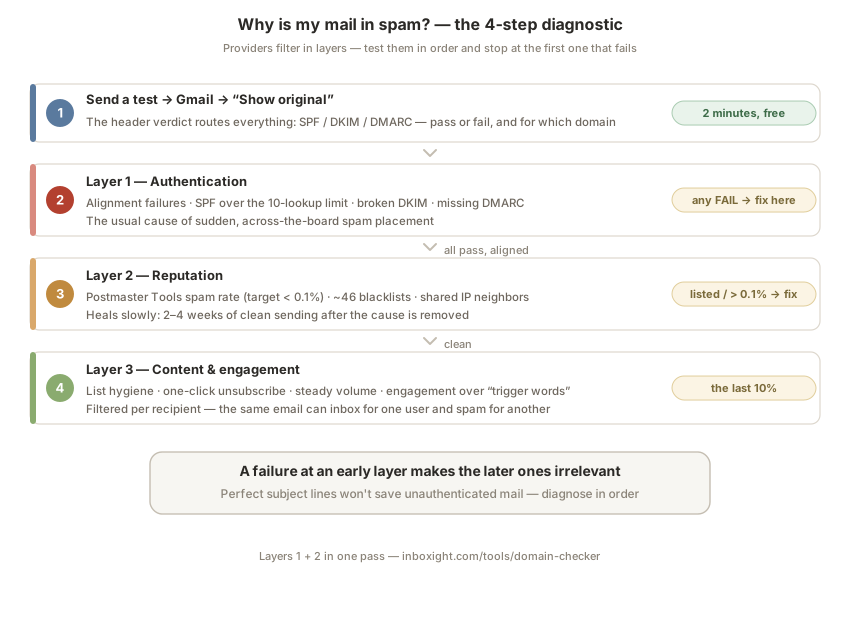
Step 1: Read the headers of a real test email
Send a normal email from your usual platform to a Gmail address you control. Open it, click ⋮ → Show original. The top of that page gives you a verdict table: SPF, DKIM, DMARC, each PASS or FAIL, plus which domain each one authenticated.
This single screen routes the whole diagnosis:
- Any FAIL, or DKIM signed by a domain that isn't yours → your problem is Layer 1. Go to step 2.
- All three pass, aligned to your domain → authentication is fine; your problem is reputation or content. Skip to step 3.
Two minutes, and you've already eliminated half the listicle.
Step 2: Layer 1: authentication
The mechanical layer, and the most common culprit for sudden, across-the-board spam placement. Since the Google, Yahoo and Microsoft requirements reached full enforcement, unauthenticated mail doesn't get the benefit of the doubt anymore, it gets the spam folder on the way to being rejected outright.
The frequent failure modes, in order of how often we see them:
Alignment failures. SPF and DKIM technically pass, but for your ESP's domain instead of yours, so DMARC fails. The fix lives in your platform's custom-domain settings; our per-ESP guides show where.
SPF permerror. Your record crossed the 10 DNS lookup limit, usually after adding one tool too many, and every SPF check now fails permanently. Invisible in your DNS, fatal in evaluation.
Broken or missing DKIM. A key rotated by a vendor, a selector removed during a migration, a signature that never got set up on one sending service. DKIM is your most important pass, it's the one that survives forwarding.
No DMARC record at all. Now a hard requirement for bulk senders, publish at least p=none, then migrate toward enforcement.
If your bounces mention 550 5.7.26, this layer is confirmed, see the dedicated fix. Fix what's broken, re-run the step 1 test until all three pass aligned, then give it a week: authentication repairs propagate in hours, but reputation recovers on its own slower clock.
Step 3: Layer 2: reputation
Authentication passes but you're still in spam? Providers trust the identity, they don't yet trust the sender. Reputation attaches to your domain and your sending IPs, and three checks cover it:
Spam complaint rate. Register your domain in Google Postmaster Tools, it's free and it's Gmail telling you directly how it scores you. The user-reported spam rate is the number that matters: under 0.1% is the target, 0.3% is the enforcement cliff. A creeping rate means recipients didn't ask for the mail, don't recognize you, or can't unsubscribe easily, list problems, not technical ones. Old addresses, purchased lists and no-permission signups are the classic feeders.
Blacklists. Dozens of DNS blocklists feed provider filters, with very unequal weight, a Spamhaus listing hurts, many others are noise. Run your domain and IPs through our blacklist checker (~46 lists in one pass). If you're listed somewhere that matters, delisting is its own process per list, the removal guide walks through it.
Shared IP neighbors. On an ESP's shared pool, someone else's bad campaign can drag the IP's reputation down with yours attached. If your domain checks out but the sending IP is listed, that's the vendor's problem to fix, or a reason to move to a dedicated IP once your volume justifies one.
Reputation damage heals slowly: expect 2–4 weeks of clean sending after the cause is removed, longer after a serious blacklist episode.
Step 4: Layer 3: content & engagement
Only diagnose here once layers 1 and 2 are clean, and know that this layer has changed. The 2005-era spam triggers ("FREE!!!", all caps, too many images) barely register with modern filters compared to engagement: opens, replies, deletions-without-reading, and above all spam reports. Gmail filters per-recipient, the same email lands in one user's inbox and another's spam folder based on their history with you.
What actually moves this layer: send to people who opted in recently and expect you; make unsubscribing one click (it's required now anyway) so annoyed readers leave instead of hitting "report spam"; prune addresses that haven't engaged in months, they're either spam traps in waiting or reputation dead weight; and keep volume steady, because a sudden 10× spike reads like a compromised account. Warm up new domains and IPs progressively over 2–4 weeks.
Content isn't irrelevant, broken HTML, link shorteners and image-only emails still hurt, but it's the last 10%, not the first suspect.
The diagnosis, compressed
Headers first: any authentication failure is Layer 1, fix alignment, SPF lookups, DKIM, DMARC. All passing? Layer 2, Postmaster Tools spam rate and a blacklist scan. Both clean? Layer 3, list hygiene, engagement, volume patterns.
Our free domain checker runs layers 1 and 2 in one pass, SPF (including lookup count), DKIM across 35 selectors, DMARC, MX and ~46 blacklists, and returns a scored report with the fixes ranked. And because every one of these failure modes drifts back over time, vendors rotate keys, lists decay, IPs get listed, Inboxight monitors the full stack continuously and alerts you when something breaks, before your open rate is the thing that tells you.
FAQ
Why did my emails suddenly start going to spam?
A sudden, across-the-board shift usually means Layer 1: an authentication break, a rotated DKIM key, an SPF record pushed over the 10-lookup limit, a DMARC alignment broken by a new tool. Gradual decline points to Layer 2: reputation eroding from complaint rates or list decay. Run the header test first either way.
Why does Gmail specifically send my mail to spam when Outlook doesn't?
Each provider scores independently, with its own filters, blacklist sources and per-recipient engagement history. Gmail weighs user engagement heavily and enforces its spam-rate thresholds via Postmaster Tools; being fine at one provider tells you little about another. Diagnose against the provider where you're failing.
Do spam trigger words still matter in 2026?
Far less than folklore says. Modern filters are dominated by authentication, sender reputation and recipient engagement; vocabulary is a minor signal. "Free" in your subject line won't spam-folder authenticated mail from a trusted sender, and flawless copy won't save an unauthenticated one.
How long does it take to get out of the spam folder?
Authentication fixes take effect within hours to days. Reputation recovery is slower: typically 2–4 weeks of clean, consistent sending after the root cause is fixed, longer after serious blacklisting or complaint spikes. There is no shortcut that skips the clean-sending period.
How do I know if I'm on a blacklist?
Check, don't guess: run your domain and sending IPs through a multi-list scan. If you're listed, weight matters more than count: a Spamhaus listing explains spam placement; an obscure list most providers ignore doesn't. Delisting steps vary per list.
Further reading: Google & Yahoo sender requirements in 2026 · The SPF 10 DNS lookup limit · DMARC from p=none to p=reject · How to read a DMARC report · Check your domain